Interpolators
Help Wanted
This section is incomplete. If you have experience with OpenTabletDriver’s interpolators, please consider contributing to this documentation.
[PluginName("My Name")]
public class MyInterp : AsyncPositionedPipelineElement<IDeviceReport>
{
    public MyInterp() : base()
    {
    }

    public override PipelinePosition Position => PipelinePosition.PostTransform;

    /// <summary>
    ///   Updates the state of the <see cref="AsyncPositionedPipelineElement{T}"/>
    ///   within a synchronized context.
    ///   This is invoked by the <see cref="Scheduler"/> on the interval defined by
    ///   <see cref="Frequency"/>.
    ///   The implementer must invoke <see cref="OnEmit"/>
    ///   to continue the input pipeline.
    /// </summary>
    protected override void UpdateState()
    {
        if (State is ITabletReport report && PenIsInRange())
            OnEmit();
    }

    /// <remarks>
    ///   This is called by <see cref="Consume"/> whenever a report is received from
    ///   a linked upstream element.
    /// </remarks>
    protected override void ConsumeState()
    {
        if (State is not ITabletReport report)
            OnEmit();
    }
}
The UpdateState in called on a set Frequency, while ConsumeState is called every time a report is received.
[PluginName("My Name")]
public class MyInterp : Interpolator
{
    private SyntheticTabletReport syntheticReport;

    public MyInterp(ITimer scheduler) : base(scheduler)
    {
    }

    // Position is received here
    public override SyntheticTabletReport Interpolate()
    {
        return syntheticReport;
    }

    public override void UpdateState(SyntheticTabletReport report)
    {
        syntheticReport = new SyntheticTabletReport(report);
    }
}
The UpdateState in called on every tablet reports, while Interpolate is called at the frequency defined by the user, represented by the Frequency property.
Confusing changes were made in 0.6.x
Interpolator have changed heavily between 0.5.x & 0.6.x.
The UpdateState method is instead called at the frequency defined by the user while the ConsumeState is called whenever a report is received from the tablet.
Keep this in mind if you make an interpolator in 0.5.x & want to make it work properly in 0.6.x.
Do not block non-handled input types (0.6.x Only)
Plugins such as Interpolators should emit non-handled report types in ConsumeState().
Failing in doing so may result in those reports being discarded.
(Preventing Bindings set by the user from being invoked & other plugins from working properly)
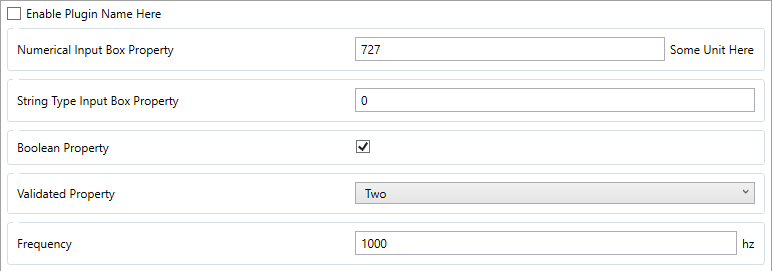
You can make your interpolator configurable by the user by adding properties to your class.
[Property("Numerical Input Box Property"),
 Unit("Some Unit Here"),
 DefaultPropertyValue(727),
 ToolTip("Filter template:\n\n" +
         "A property that appear as an input box.\n\n" +
         "Has a numerical value.")]
public int ExampleNumericalProperty { get; set; }

[Property("String Type Input Box Property"),
 DefaultPropertyValue("727"),
 ToolTip("Filter template:\n\n" +
         "A property that appear as an input box.\n\n" +
         "Has a string value.")]
public string ExampleStringProperty { get; set; }

[BooleanProperty("Boolean Property", ""),
 DefaultPropertyValue(true),
 ToolTip("Area Randomizer:\n\n" +
         "A property that appear as a check box.\n\n" +
         "Has a Boolean value")]
public bool ExampleBooleanProperty { set; get; }

// 0.6.x Only
[Property("Validated Property"),
 DefaultPropertyValue("Two"),
 PropertyValidated(nameof(SomeChoice))]
public string SomeValidatedProperty { get; set; } = string.Empty;

public static IEnumerable<string> SomeChoice { get; set; } = new List<string> { "One", "Two", "Three" };
Note
The Enumerable used for a PropertyValidated must be a static field.
See also
You can find the 0.6.x sample code here.
See also
You can find the 0.5.x sample code here.